OKF Explorer Persona Manual
For current controls, use Use Explorer. The dated screenshots below are retained as historical illustrations; they may show older layout and selection behaviour.
This manual describes the Explorer through user stories. It is written for people who need to browse a pack, evaluate an API/data source, demonstrate the Explorer, or build a better OKF bundle.
Screenshots were captured from the local GitHub Pages build on 2026-07-08 using the UK Government APIs OKF descriptor.
For the newer deterministic Search, Filter results and Sort interface, see the Static Search and Filtering Manual. Its screenshots use the GOV.UK CKAN large corpus and supersede Stories 2 and 3 for retrieval-state behaviour.
The behaviour expectations are grounded in GOV.UK-style service quality: understand real user tasks, make the service simple, make it accessible, expose source/provenance clearly, use open standards, protect privacy/security, and measure whether the service works.
The machine-readable traceability now covers seven personas and nineteen
stories: the ten broad Explorer stories in this manual plus nine focused Map
stories in the
Geospatial Map personas and user stories.
It is stored in
evaluation/okf-explorer/journeys.json.
It names the evaluation questions attached to every story and adds browser
journeys for facet selection, sorting, URL restoration, graph-edge highlighting
relationship-drawer resizing, and Map reduction/record selection. The CKAN example has its own
personas and user journeys, while the
legislation example uses the dedicated
legislation personas and journeys.
Personas
| Persona | Goal |
|---|---|
| Policy researcher | Find relevant APIs/data sources and understand public-sector provenance. |
| Data engineer | Decide whether a source has usable endpoint, protocol, licence, contract and access metadata. |
| Service assessor | Check whether the display makes terms clear, exposes gaps and supports keyboard/accessible inspection. |
| Knowledge curator | Improve a pack so search, facets, graph, timeline, map and cards work well. |
| AI operator | Point an AI at the pack and get sourced answers rather than hallucinated catalogue summaries. |
| Spatial data analyst | Find coordinates, spatial files and ArcGIS/OGC services, then inspect bounded geometry with source context. |
| Area-based policy analyst | Find statistics, reports and services about named areas even when source geometry is absent. |
Story 1: Start With The Overview
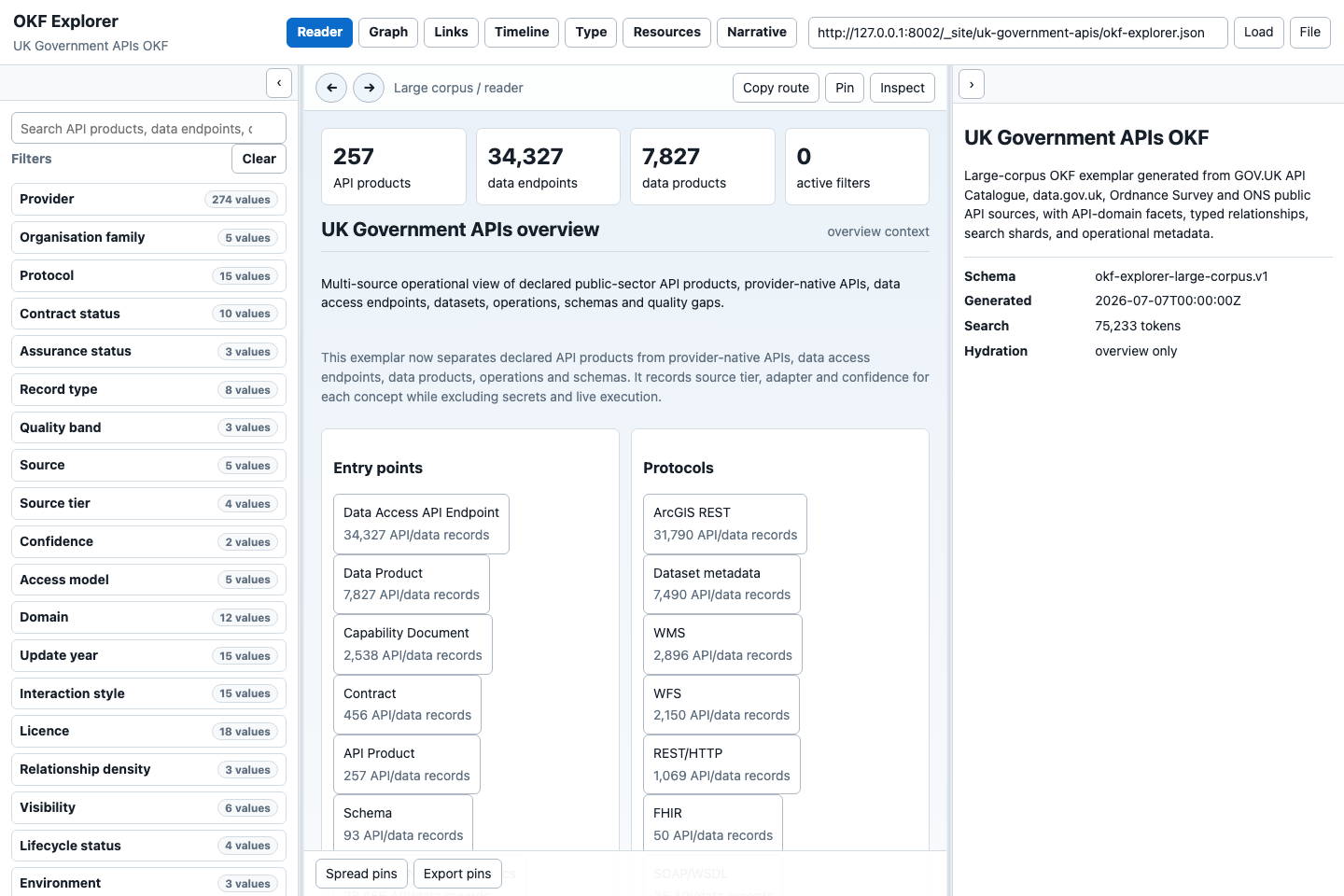
As a policy researcher, I want the pack to open with an overview, so I can tell what corpus I am reading before applying filters.
Expected behaviour:
- The page loads the bundle descriptor from the Bundle URL field.
- Reader is the default view for the shared UK Government APIs link.
- Count cards distinguish API products, data endpoints, data products and active filters.
- The left panel starts with search and closed facets.
- The right panel explains schema, generated timestamp, distinct indexed-term count and hydration state. This is local search vocabulary, not AI-token usage.
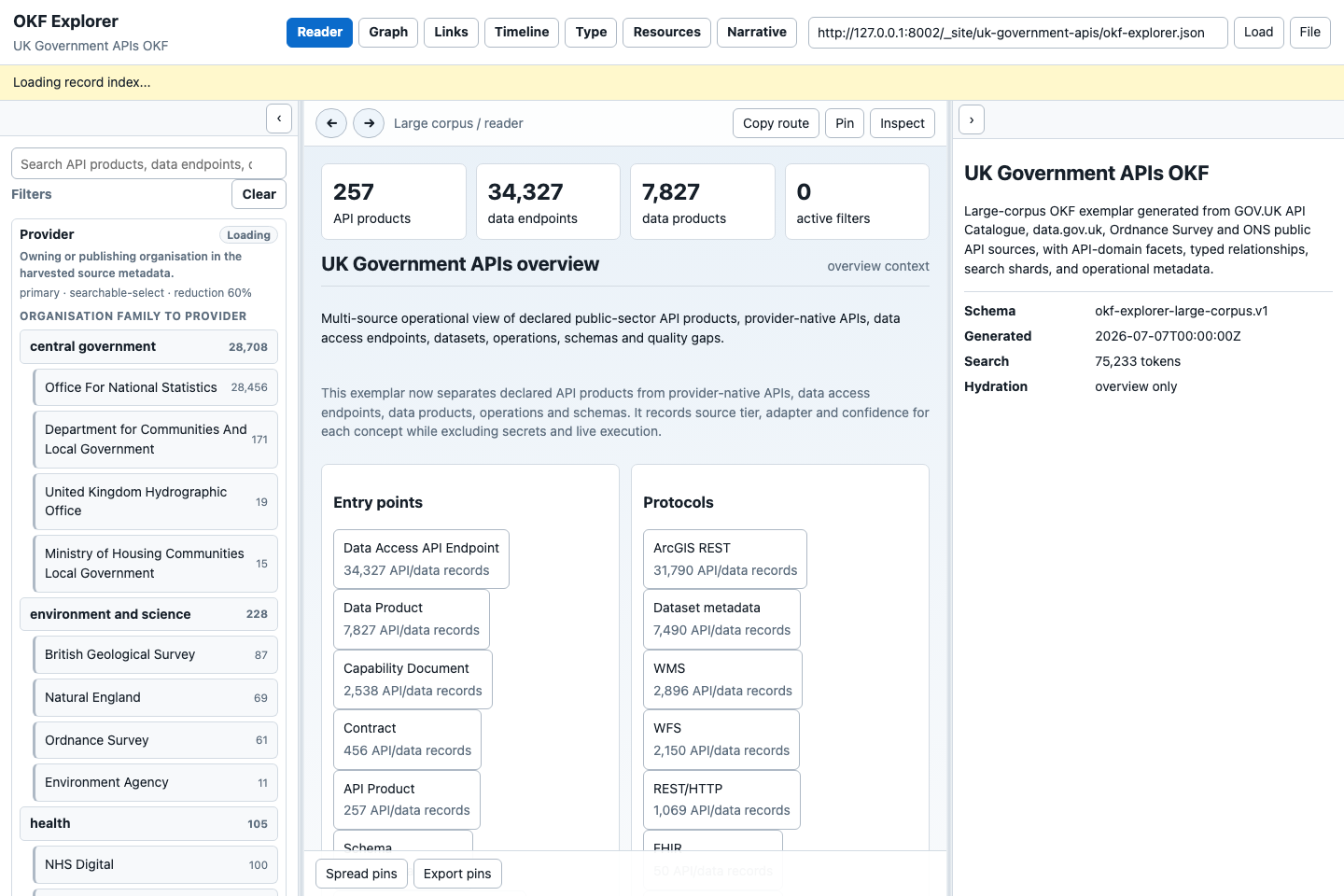
- If the app is still loading a background index, a visible status line says so without blocking overview reading.
Use this state for a demo opening. It shows the key correction in the exemplar: formal API products, data access endpoints and data products are counted separately.
Story 2: Open And Search A Facet
As a data engineer, I want to open Provider, search inside it and select a known provider, so I do not depend on whichever providers happen to be highest by count.
Expected behaviour:
- Search remains above Facets and Results because it changes their shared context. Provider hierarchy browsing depends on bundle capabilities.
- Manageable closed facets with complete vocabulary counts show a proportional distribution strip on first load. Hovering or focusing a segment names its value and count below the strip; truncated or high-cardinality facets show a labelled search preview with representative examples instead.
- Clicking a closed facet opens it immediately.
- If the facet needs full record hydration, it should show a loading state in the facet body and then show values without requiring a second click.
- Only the open facet renders its values. Closed facets show counts and selected summaries only.
- High-cardinality facets expose an in-facet search box and paged values.
- A plain click on a strip segment or value toggles its highlight. The URL retains the shared selection. Ctrl-click or Cmd-click enables multiple values.
- Click or Enter highlights the focused value. Double-click or Alt+Enter keeps the highlighted set; Keep unhighlighted keeps its complement. Use the current interaction guide for folding, pins and multi-value selection.
- A direct star pins the facet open while another facet is explored. The drag handle reorders facets; Move earlier/Move later in the actions menu is the keyboard fallback where provided. Every newly opened bundle starts folded, including pinned facets; opening a pinned facet keeps it open during the session.
- The facet actions button, header right-click and
Shift+F10expose pin, move, hide, clear and explain commands. There is no legacy Adjust command, and right-clicking a facet value does not select it. - Browse renders provider hierarchies as foldable parent/child rows rather than silently truncating them into the ordinary facet list.
- Clear removes active filters and search context.
If Provider and Canonical provider contain the same user-facing choice, the UI should avoid making the reader choose between duplicate navigation facets.
Story 3: Search Across The Static Index
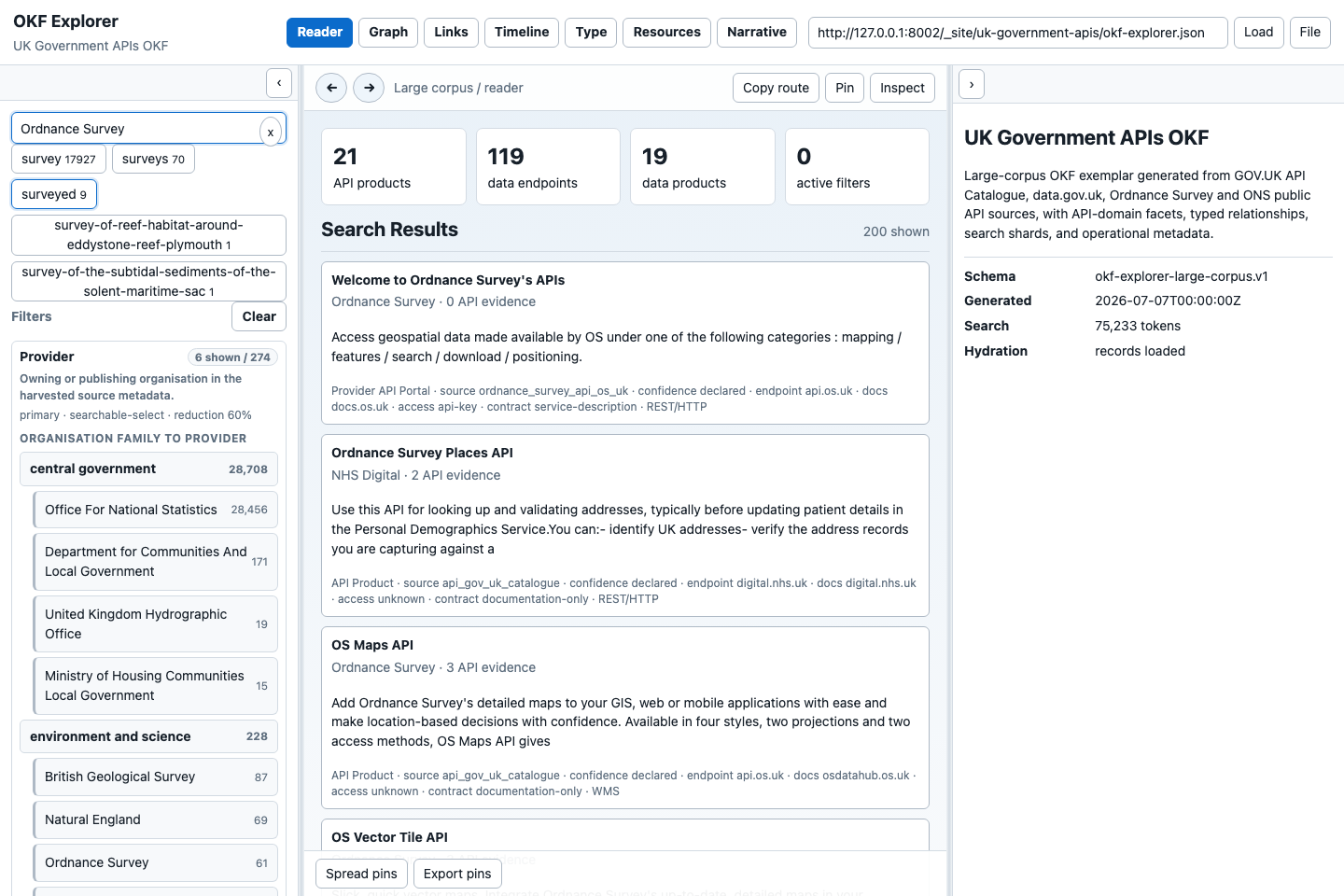
As a policy researcher, I want to search for "Ordnance Survey" and see matching products, provider-native API records, operations and endpoints without waiting for the whole corpus to load.
Expected behaviour:
- Typing in the search box uses the static search index first.
- A clear
xappears when text is present. - Changing from one materially different query to another clears stale selected record context.
- Search chips show indexed terms and counts.
- Results show title, provider, evidence count, summary, record type, source, confidence, endpoint/docs hosts, access model, contract status and protocol where available.
- Searching should feel alive: status text should say when records are loading or when only the static index is currently available.
Search is not proof that the source is complete. It is a way into the pack, followed by record inspection.
Story 4: Inspect A Record Card
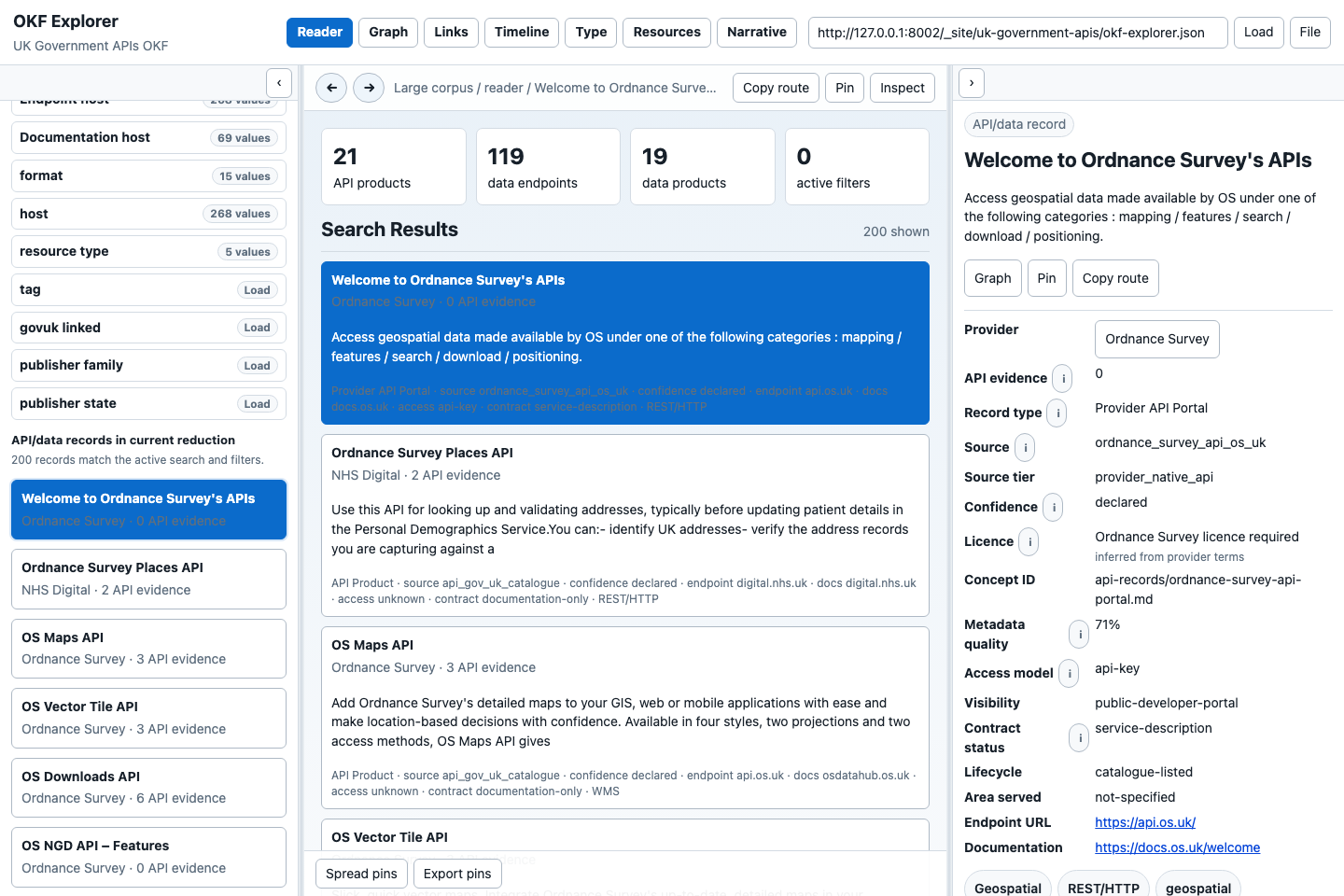
As a data engineer, I want to click an API/data record and inspect the right card, so I can judge provenance, access, licence and contract status.
Expected behaviour:
- A single click inspects a record and populates the right card.
- The active result is visibly selected.
- The right card starts with the record title and summary, then separates Overview, Evidence and Data as peer tabs. Optional sections remain disclosures within each tab.
- A lightweight search card puts Load full record with the primary actions near the title rather than below all available metadata.
- The first Overview disclosure starts open. Context, normalised fields, standards alignment, quality, provenance, additional metadata, resources and relationships start folded and can be opened independently.
- The card surfaces the best source-supplied update date near the title and
labels CKAN
metadata_modifiedexplicitly as Catalogue metadata updated, with a warning that it is not necessarily the dataset’s latest release or update frequency. - CKAN-derived cards include a folded Current source and maintenance section. It shows evidence-backed canonical source, publisher, frequency, release, distributions, API, specification and licence fields when supplied by the bundle. Otherwise it declares an operational metadata gap and exposes CKAN-declared dataset reference dates/update frequency plus publisher/distribution links as qualified leads, not as automatically current or authoritative sources.
- When resources or explicit temporal metadata name years, a Dates and related records block shows those years, the declared series and any other records with the same stable series identity. It states when no other series member is present in the loaded bundle.
- Route, record type, source, source tier, confidence, provider, endpoint URL, documentation URL, access model, licence, contract status, protocol, topics and timestamp are visible where known.
- Info icons explain terms such as API evidence, confidence, licence basis, metadata quality and missing timestamps.
- Missing values use reader-facing wording such as "Not recorded in source
metadata" rather than raw
None. - Topic, protocol and tag chips are clickable filters.
- Copy route copies a stable route that can be shared or cited.
- Graph switches to graph context for the inspected record.
- Pin preserves useful records for comparison/export.
- When a record declares a browser-readable source API, View source data opens an in-Explorer Source Inspector. Its Summary, searchable JSON tree and Raw JSON views keep the selected record and retrieval context available.
- Open raw JSON ↗ is an explicitly secondary escape hatch. It always opens a new browser tab and never replaces the Explorer window.
The Source Inspector reports the response host, media type, size and retrieval
time. It renders remote values only as text, caps responses at 10 MB and gives a
direct new-tab fallback when cross-origin policy, availability or response size
prevents in-app display. Known legacy data.gov.uk/api/action/ links resolve
through the canonical browser-readable GOV.UK CKAN action endpoint. Returning to
the record does not re-run the search or discard its filters.
Source Inspector dates describe the remote metadata record. They do not override a bundle’s separately evidenced operational metadata or prove that a dataset stopped changing when its catalogue entry stopped changing.
The card must distinguish "observed public metadata" from operational assurance. A declared provider API portal is not automatically a live, open, free or assured API.
Contextual discovery versus global facets
There are three plausible places to answer “is this series available for other years?”:
- The selected record card (current recommendation). It is closest to the question, can distinguish source update dates from coverage/resource years, and can say whether another record shares an explicit series identity.
- A
Search and filters/This recordtab pair in the left panel. This becomes useful when bundles provide several contextual dimensions—series, versions, superseded records, geographic editions and related publications— but introduces hidden state and makes global filters less continuously visible. - Timeline only. This remains useful for exploring the whole active reduction, but update-year buckets cannot safely stand in for the selected record's temporal coverage.
Explorer therefore starts with the contextual block in the card and keeps global facets in the left panel. A tabbed left panel should be reconsidered when at least three well-supported record-context groupings compete for space, not merely to relocate one date/series question.
Story 5: Use Graph Without Getting Lost
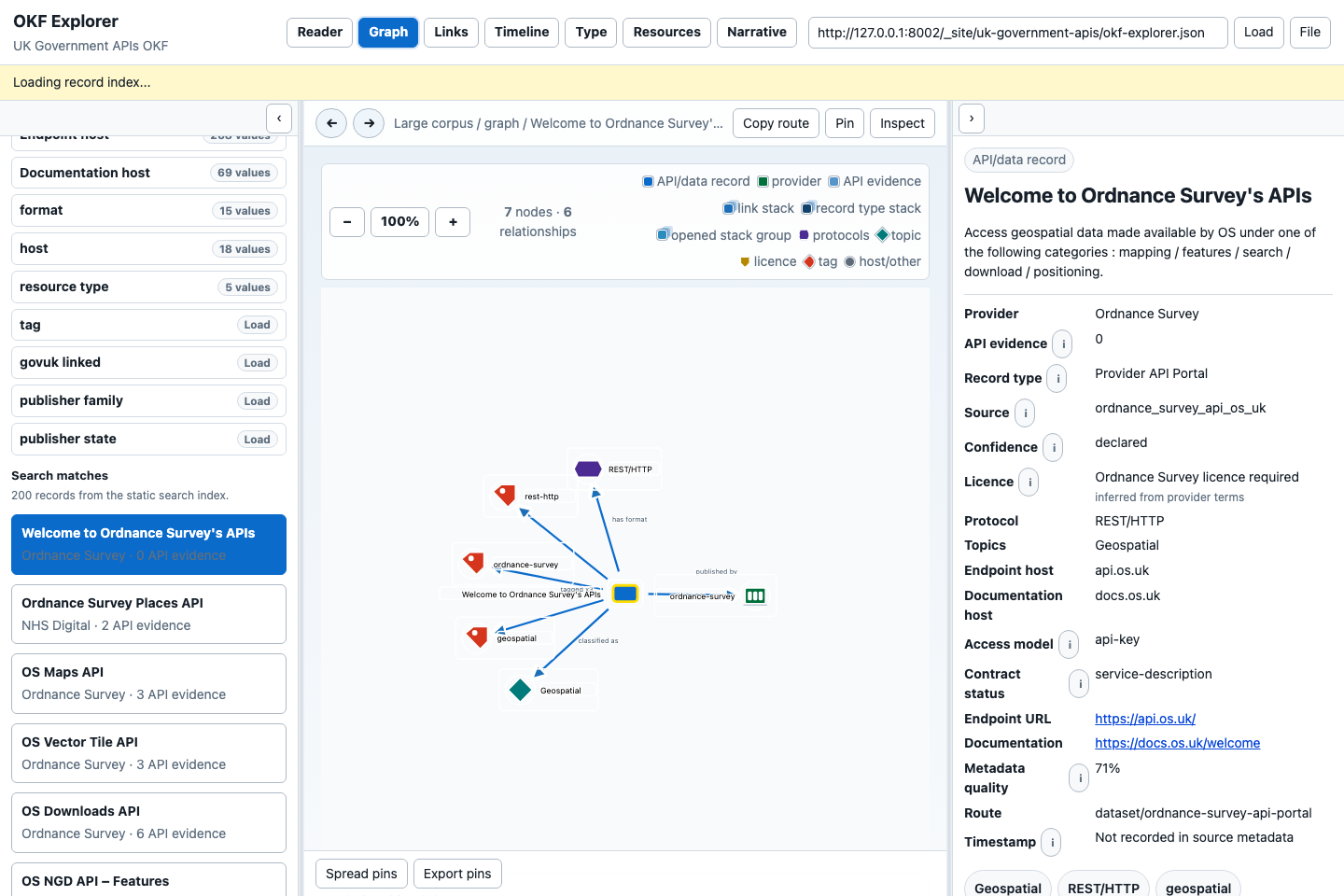
As a knowledge curator, I want Graph to show relationships without making dense clusters unreadable, so I can understand the context instead of fighting the layout.
Expected behaviour:
- Graph shows node and relationship counts for the current context.
- The legend explains colours and shapes for API/data records, providers, evidence, stacks, record-type stacks, opened-stack groups, protocols, topics, licences, tags and host/other nodes.
- Plus/minus controls zoom; the graph can be panned.
- Single-click inspects a real node in the right card.
- Clicking a relationship row inspects that relationship and keeps the exact edge visibly selected on the graph.
- Double-click navigates or reduces context.
- Double-clicking metadata nodes such as provider, host, format, topic, tag or licence applies the corresponding facet reduction where available.
- Dense API/data records collapse into count-bearing stacks.
- Opening a stack expands one group at a time and restacks the previous group.
- If a stack is too large, it should regroup by a semantic dimension such as record type, format, topic, licence, access model, source adapter or update year.
- Arrowheads should terminate at node/card/icon boundaries, not pass through visual centres.
- Labels should not hide selected nodes or each other at normal zoom levels.
- The relationship drawer has a visible drag target that changes its row area; Up/Down arrows resize it when the handle has keyboard focus.
- Spread pins helps recover a dense layout; Export pins records the current graph positions.
Known visual-regression evidence for graph clutter lives in
evaluation/okf-explorer/evidence/ and is part of the evaluation harness.
Story 6: Review Time
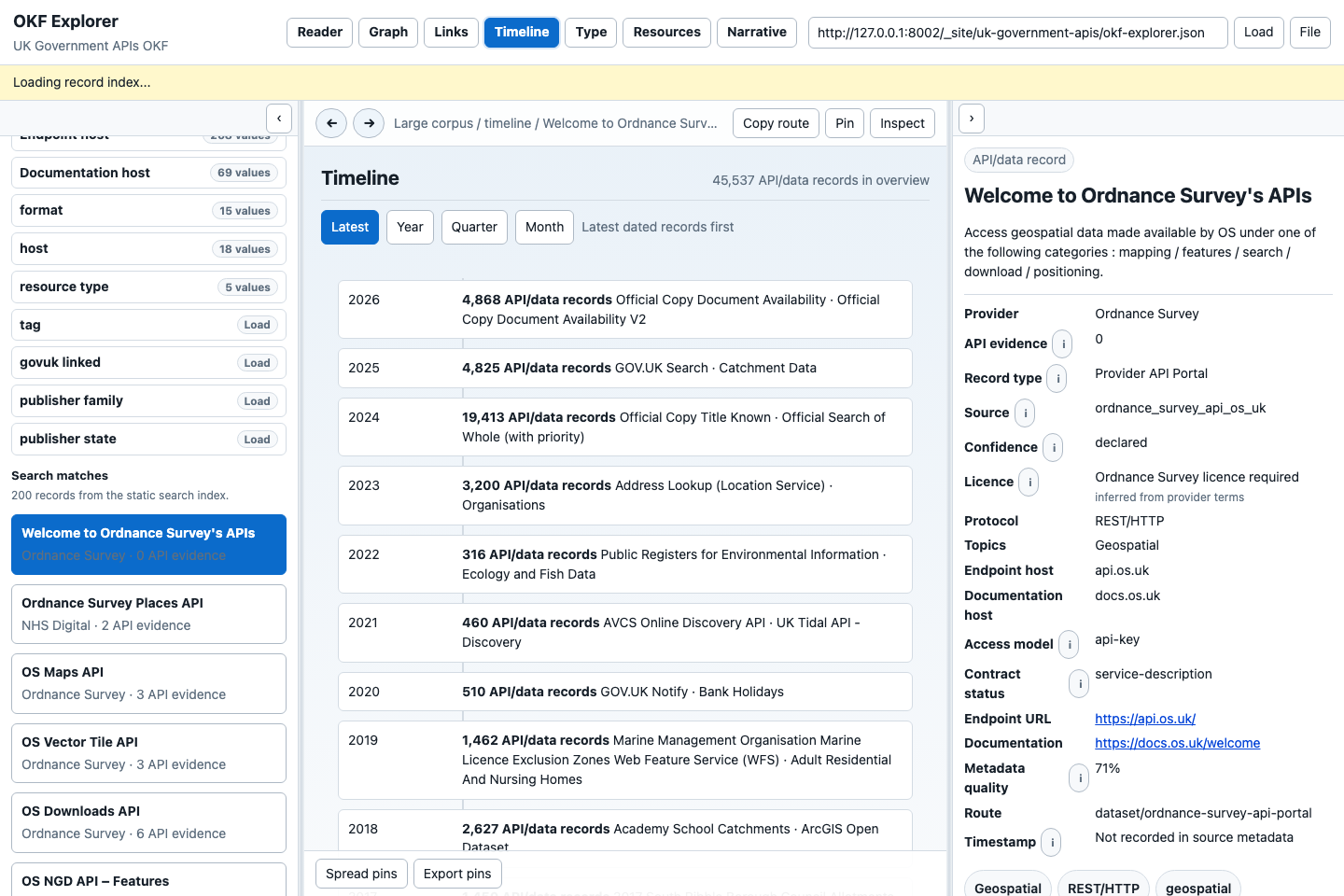
As a researcher, I want a time-ordered view with "latest first" and grouped time buckets, so I can avoid being stranded on old records.
Expected behaviour:
- Timeline defaults to Dated records, with the newest primary dates first.
- Each primary date names its role: source coverage or publication, inferred period, capture or record audit. Primary date role can show only declared source dates or only records whose primary date is an audit date.
- Year, Quarter and Month group dated metadata at progressively finer resolution.
- An analysis overview bucket can apply its declared date facet. A hydrated date bucket opens its first sample; it does not silently create a date filter.
- Missing dates are shown as missing source metadata, not as new, stale or invalid.
- Timeline should reflect the active search/filter reduction.
- Opening Timeline directly on a selected indexed record loads the record and resource index needed for its periods. This uses the existing browser memory limit; Graph can still use bounded record relationships without loading the whole index.
- An explicit operational source release date is distinct from a catalogue timestamp. A month or year alone remains at that precision; an unknown date or dynamic marker does not become a publication date.
- Month and quarter groups retain a “not specified” group for coarser dates. Expand Audit dates to inspect capture and generation alongside a source date. Listing-page and HTTP updates are not document publication evidence.
See conceptual navigation and date evidence for classification methods, review labels, incomplete coverage and date roles.
The timeline is a navigation aid and a metadata-quality signal. It is not a guarantee that the underlying API was created or modified on that date unless the source metadata says so.
Global date facets and Timeline answer “which records in this reduction were updated when?” A selected record's Dates and related records block answers the different question “which periods and other members of this declared series are present?” Keeping those questions separate avoids making a broad update-year facet look like a claim about the selected dataset's coverage.
Story 7: Compare Record Types
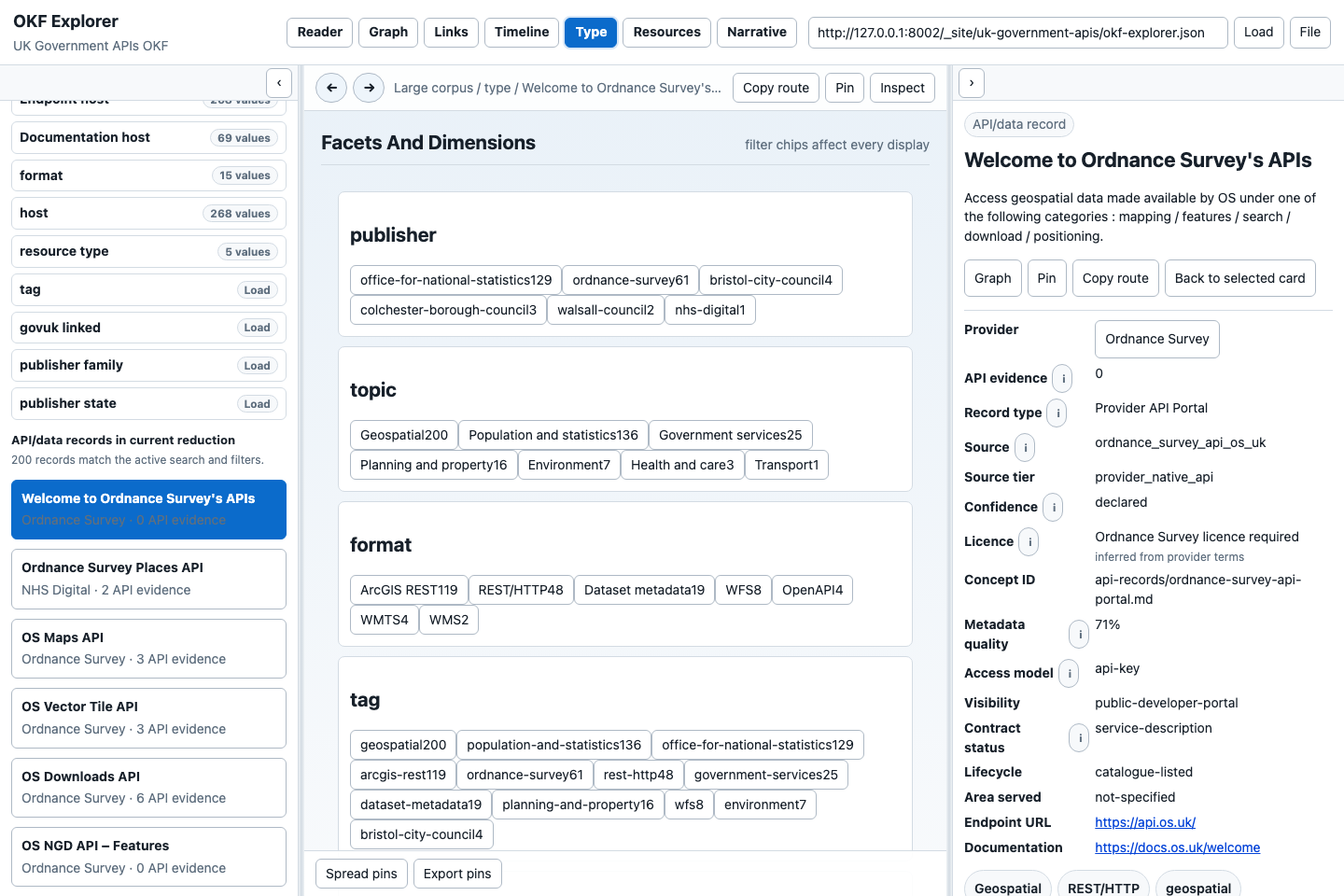
As a service assessor, I want Type view to explain what kinds of records are in the current context, so I do not confuse data products with API products.
Expected behaviour:
- Type view groups the current context by record type.
- Record types use plain-language labels: API Product, Data Access API Endpoint, Data Product, API Operation, Capability Document, Contract, Schema and Provider API Portal.
- Counts reflect the active reduction and search.
- Selecting a type should show representative records and keep the right card context understandable.
This is one of the most important views in the UK Government APIs exemplar because thousands of data access endpoints should not be reported as thousands of formal API products.
Story 8: Inspect Resources
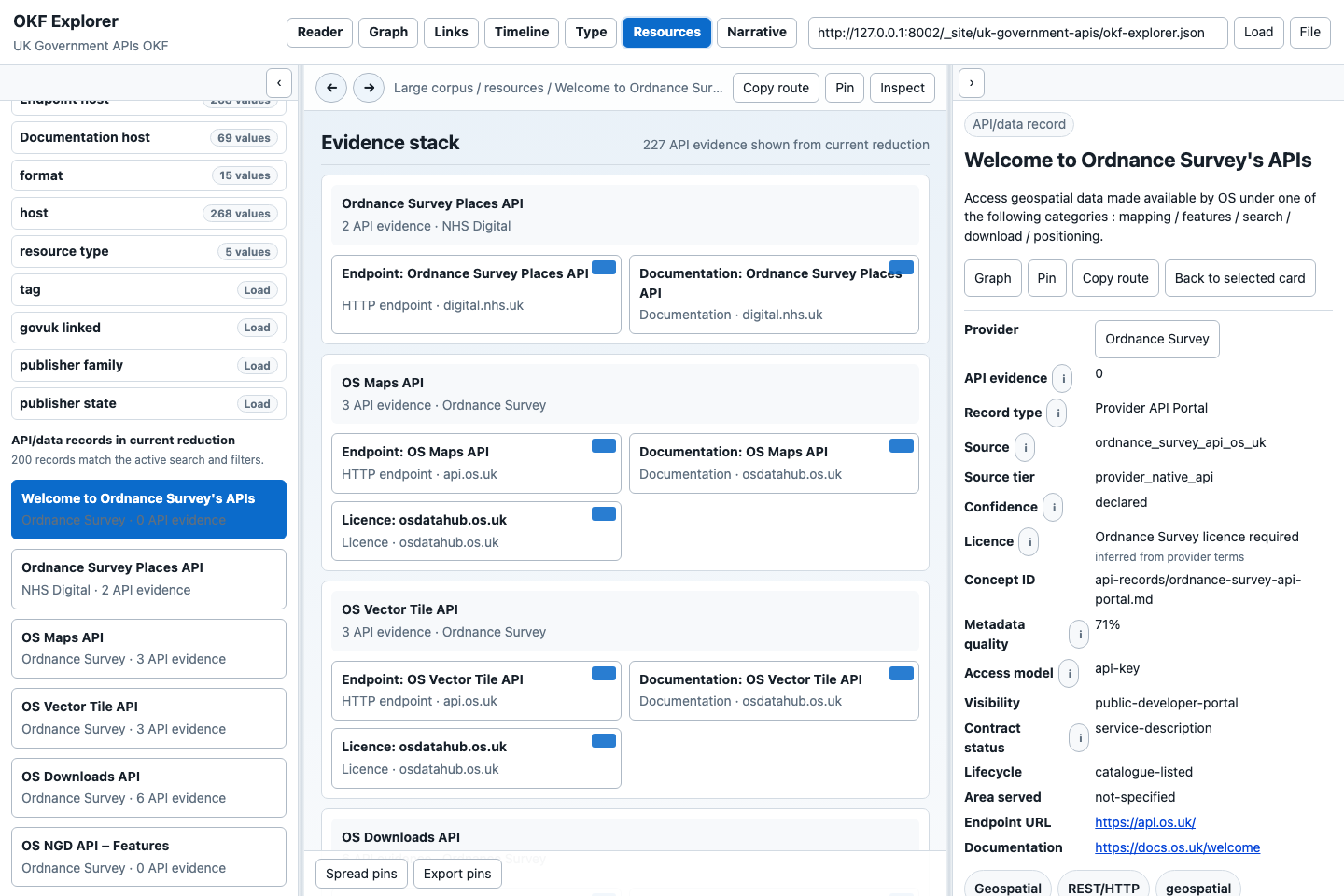
As a data engineer, I want Resources view to expose endpoint hosts, formats, documentation and resource types, so I can judge integration routes.
Expected behaviour:
- Resources view shows endpoint/resource groupings for the active context.
- Host, format, resource type and documentation host are visible when known.
- Resource cards should link back to the owning API/data record.
- Resources should preserve licence/access/contract metadata from their parent or expose when it is inherited.
- Large resource lists stay bounded and lazy-loaded.
Story 9: Handle Corpus Boundaries Honestly
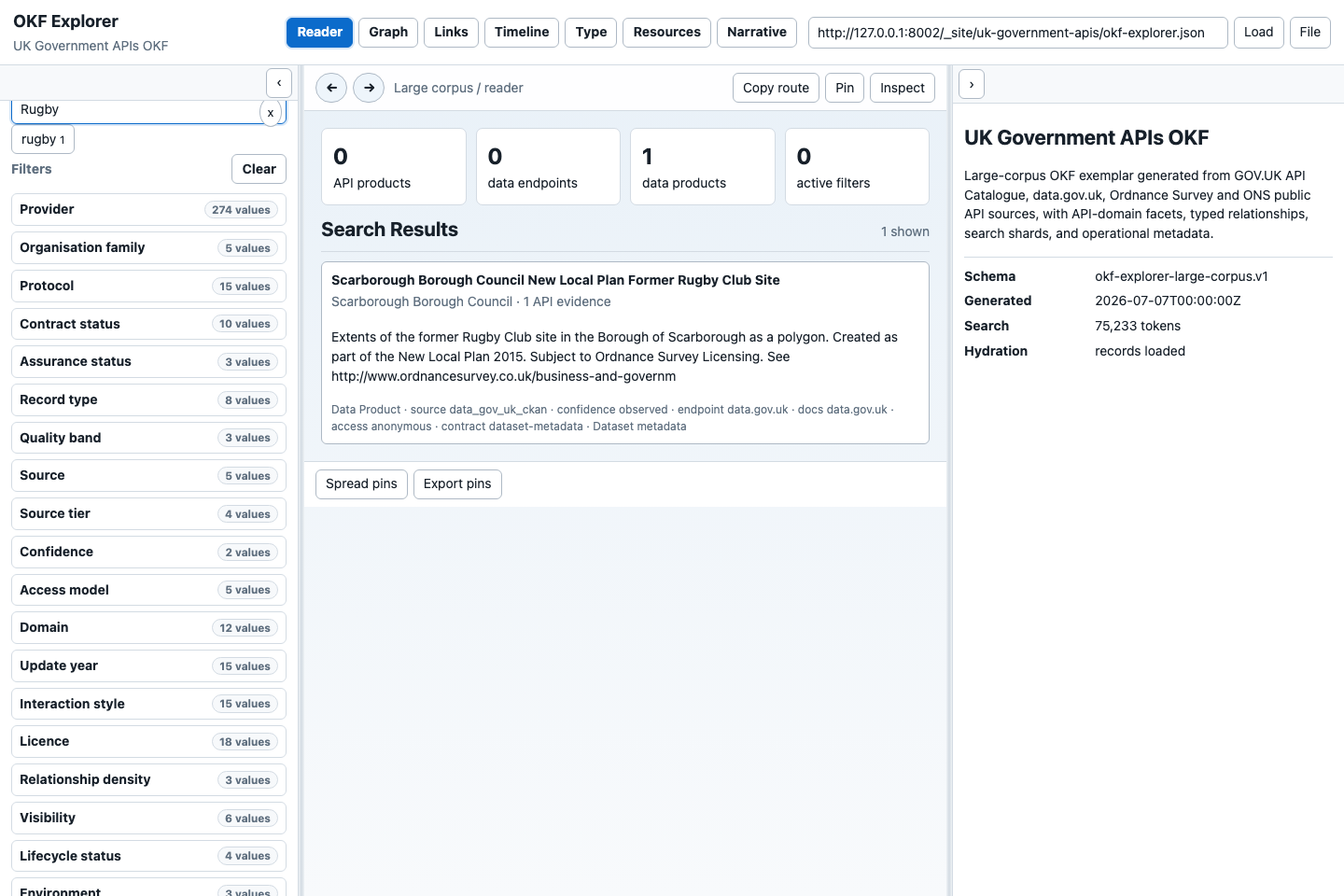
As an AI operator, I want the UI to show when a search has only one match in this pack, so I do not assume the wider web would also have one match.
Expected behaviour:
- Search results count is explicit.
- The right panel keeps overview context if no record is selected.
- A one-result search is not treated as an error.
- Documentation explains when a result count is a corpus boundary rather than a statement about the real world.
The evaluation harness includes a Rugby question for this reason.
Story 10: Reduce And Inspect Spatial Evidence
As a policy researcher or data engineer, I want to reduce the current context by geography or spatial evidence and select a mapped record, so ArcGIS/OGC data and area-based statistics are discoverable without turning browsing into an AI or server-backed application.
Continue with the illustrated Map manual for the full workflow and the focused geospatial stories for precision, preview, recovery, durable-state and accessibility acceptance rules.
Expected behaviour:
- Map starts from the same search and facet context as Reader and Graph.
- Evidence chips distinguish coordinates, declared coverage, map/feature services, spatial files and text-only spatial signals.
- Recognised UK place chips and evidence chips persist as a
geo=URL reduction and continue to affect other views until cleared. - Solid markers mean source coordinates. Ring markers are labelled representative centroids and do not imply an inferred boundary.
- Marker and list selection opens the normal provenance-bearing record card.
- External resources always retain an Open source ↗ route.
- Direct GeoJSON and ArcGIS feature services may be previewed only after an explicit action, within response/feature/coordinate caps; CORS, service or format failures leave the local metadata and source link intact.
- No geocoder, tile service, credentials, AI call or private proxy is required for initial Map browsing.
Other UI Behaviours
| Behaviour | Expected result |
|---|---|
| Bundle URL field | Paste a public HTTPS bundle or descriptor URL, click Load, or use a recent/suggested URL. Suggestions close when focus moves away. |
| File button | Load a local bundle file for private inspection without publishing it. |
| Left collapse button | Collapse or restore the facet/search panel. |
| Right collapse button | Collapse or restore the detail card panel. |
| Back/Forward | Navigate in-app route history. Disabled state should be clear when no target exists. |
| Copy route | Copy a stable route for the current view or selected record. |
| Inspect | Show structured JSON/metadata for the current context where available. |
| Reduce context | Narrow the current view to the selected card or metadata value. |
| Load full relationships | Hydrate relationship chunks with caps/truncation notices; should not make Graph unreadable. |
| Links view | Show relationship summaries first, then drill into rows and right-card detail. |
| Map view | Reduce by explainable spatial evidence/coverage, select records, and progressively load bounded external feature previews. |
| Narrative view | Present generated pack methodology, caveats, warnings and source boundary notes. |
| Loading states | Show visible status for bundle loading, index loading, facet hydration and record hydration. |
| Error states | Explain failed bundle loads, invalid URLs, transient shard errors and unavailable search shards without losing the loaded pack when possible. |
| Keyboard use | Buttons, inputs, tabs, facet values, graph controls and right-card links should be reachable with visible focus. |
| Accessibility text | Icon-only controls need accessible names or visible tooltips. |
Demonstration Guidance
For a 20 minute demo, follow demo-script-2026-07-09.md. Keep the demonstration grounded in user stories:
- "I need to know what exists."
- "I need to find a provider/API/data source."
- "I need to know whether it is usable and under what terms."
- "I need to see relationships without losing provenance."
- "I need an AI to answer from the pack, not from guesses."